Handwritten script font for branding and invitations
Shanhie by Shanhie is a script typeface created to introduce a handwritten, calligraphic touch to desktop and print layouts. The font reproduces fluid, connected strokes that suit display headings, invitations, and logo work while preserving readable letterforms. It is distributed as a standard TrueType (.ttf) file for simple installation on desktop systems. Graphic designers, social media creators, and event planners gain a handcrafted look without commissioning bespoke lettering.
What effect does Shanhie add to on-screen and printed typography?
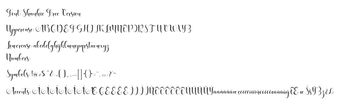
Shanhie applies a distinct calligraphic flair through fluid, rhythmic strokes and connected characters that emulate natural handwriting. That visual quality gives headings and short-form text an artisanal feel without custom lettering. Typical uses cited include invitations, logos, and promotional graphics; these scenarios benefit from the font's decorative rhythm rather than long paragraphs of body text.
How much typographic control does Shanhie give designers?
The font includes a full set of uppercase and lowercase letters plus standard numerals and basic punctuation, enabling conventional typesetting and simple layout tasks. Its vector outlines maintain shape fidelity at larger sizes, which supports print output and scaled artwork. Designers can rely on consistent stroke contrast and letter joins when applying the face to display-scale work, though advanced typographic features or alternate stylistic sets are not specified.
Is Shanhie straightforward to install and use across desktop applications?
Shanhie ships in standard font formats and is compatible with Windows and macOS, so it works with any desktop application that accepts TrueType or OpenType files. Installation follows the usual workflow: extract the downloaded ZIP, then right-click the .ttf/.otf file and choose Install. Note that cloud editors like Google Docs require a local font uploader or hosting through a web font service to access system-installed faces.
What licensing and multilingual checks should users perform before deployment?
The font is frequently listed on public repositories as Free for personal use, so commercial projects require consulting the included license file or the designer. The character set covers standard Latin characters but does not promise extended accented glyphs; users targeting multiple languages should verify the font's character map. Community reception on repository sites is positive, which supports confidence in aesthetic suitability for event and social media work.
Practical choice for display use, with licensing checks advised
Shanhie is a practical option for designers who want a handwritten script for display headings and branding. Expect the typeface to perform best at larger sizes where its calligraphic strokes remain legible; avoid using it for extended body copy. Verify licensing and extended glyph coverage before commercial or multilingual projects, and test kerning at intended sizes as a routine prepress step.
Pros
Fluid, connected strokes that emulate natural calligraphy
Includes uppercase, lowercase, numerals, and basic punctuation
Distributed as standard TrueType and usable in desktop apps
Positive reception on font repositories among design users
Cons
Extended accented characters may be limited; check the character map
Commercial-use terms vary; inspect the included license file
Better suited to display text than continuous body copy
Laws concerning the use of this software vary from country to country. We do not encourage or condone the use of this program if it is in violation of these laws. Softonic may receive a referral fee if you click or buy any of the products featured here.